Example of an online shopping scam

What Are Online Shopping Scams?

Online shopping scams use fake stores, fraudulent listings, and misleading deals to steal money or personal information.


Scammers may:

  • Create fake websites that imitate legitimate retailers
  • Advertise popular products at unbelievably low prices
  • Accept payments for products that never arrive
  • Sell counterfeit items or steal customers' payment details

These scams can appear in social media advertisements, online marketplaces, search results, and unsolicited messages. Knowing the warning signs can help you avoid losing money.

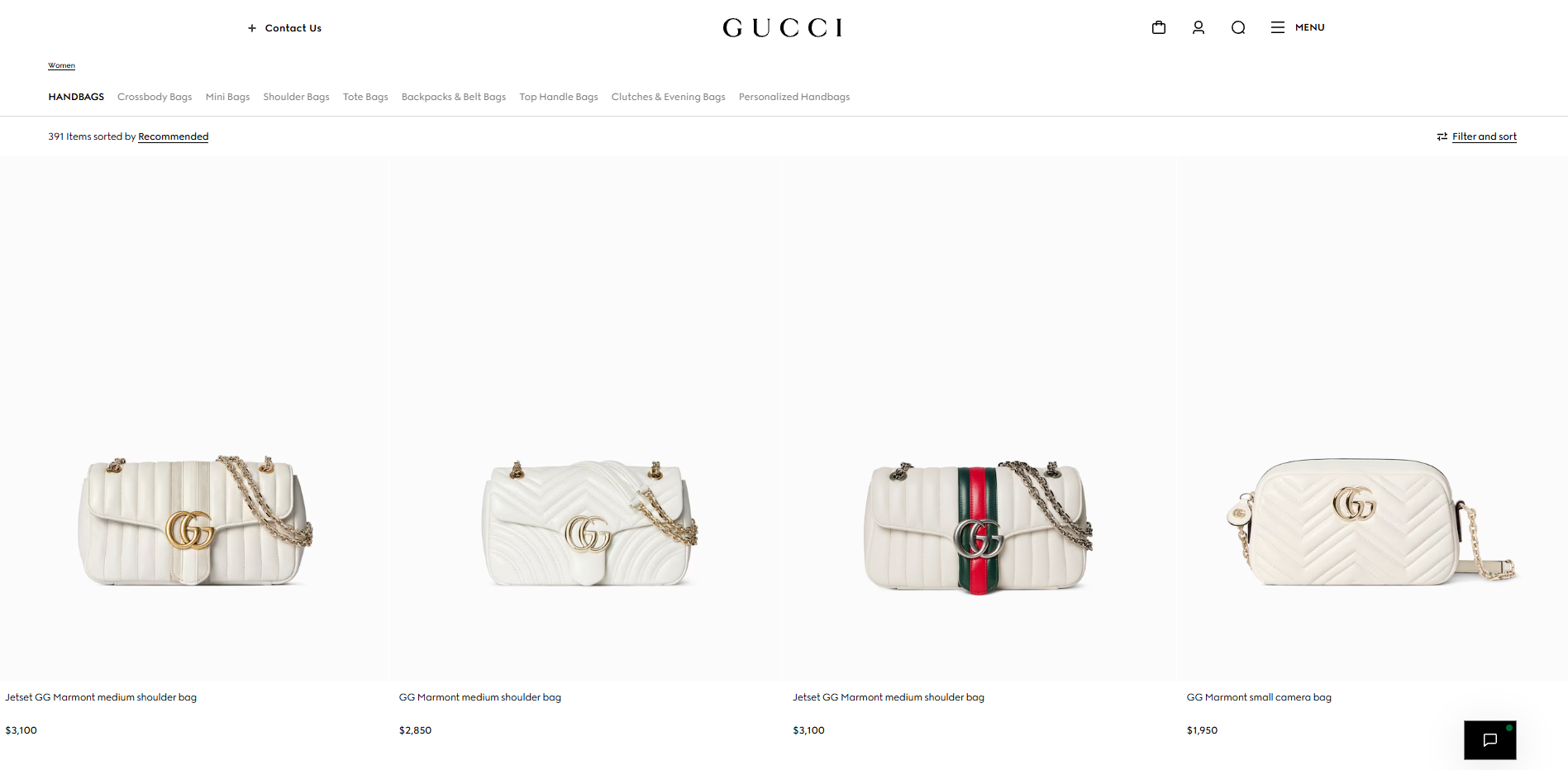
Legitimate Example

Example illustrating a legitimate online shopping listing

A legitimate retailer provides clear product details, transparent pricing, and understandable shipping and return policies. You can independently verify the business and use a recognized checkout process with appropriate payment protections.
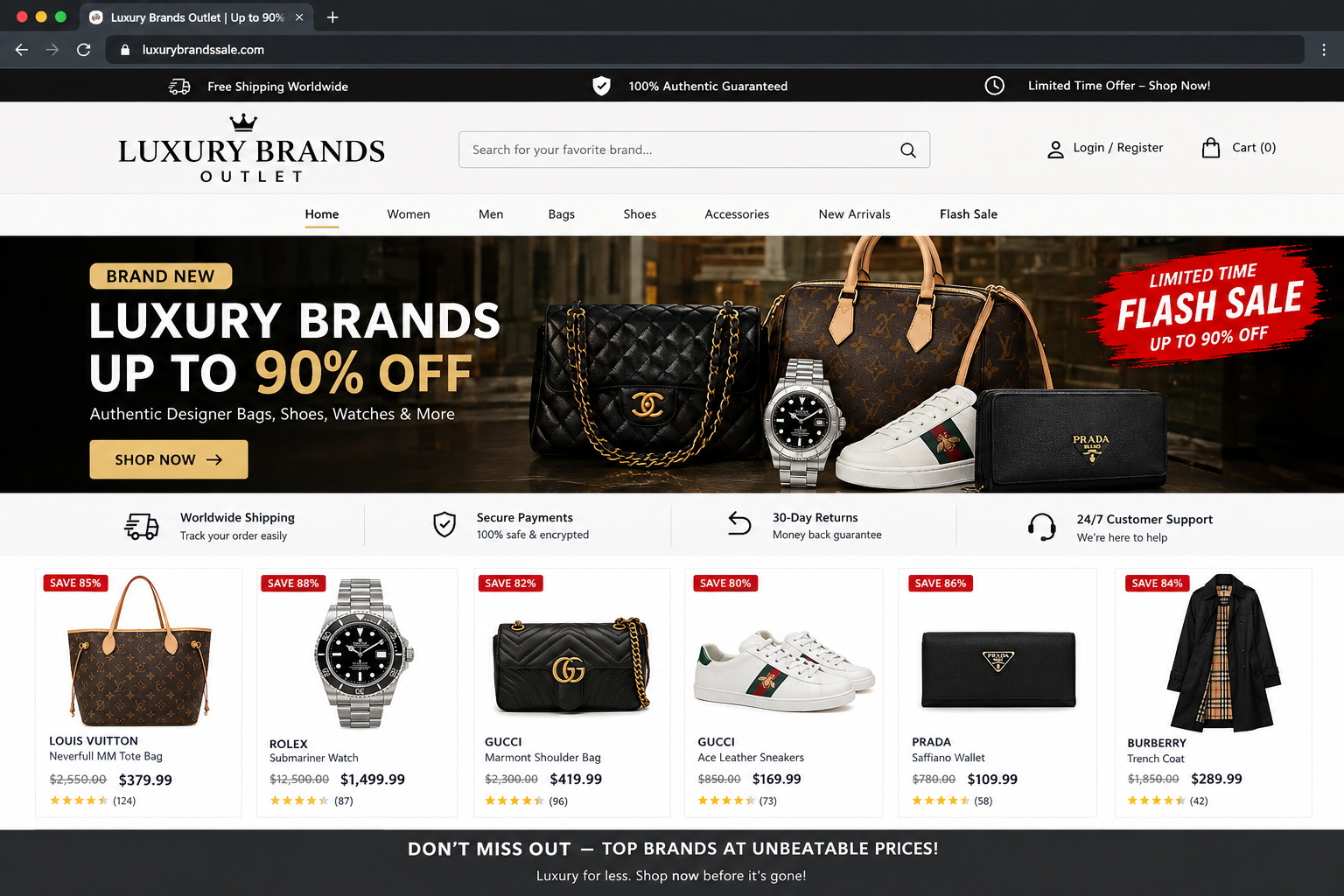
Scam Example

Example illustrating a fraudulent online shopping offer

A scammer advertises an expensive product at an unusually low price and pressures you to buy immediately. The website may use copied product photos, fake reviews, or a misleading domain. After payment, the product may never arrive, or your payment information may be misused.


Remember: a professional-looking website or a large discount does not prove that a seller is legitimate.

How Online Shopping Scams Work

Scammers create convincing offers to gain your trust and get you to pay. They may then disappear, send counterfeit products, or misuse the information you provide.


1. An Attractive Offer

You find a product through an advertisement, marketplace listing, email, or unfamiliar online store. The price may seem unusually low, or the seller may claim that only a few items remain.

2. A Purchase or Payment Request

The seller encourages you to buy quickly. You may be directed to a fake checkout page, asked to pay outside the marketplace, or prompted to enter personal and payment information.

3. The Scam Is Revealed

The product never arrives, a counterfeit item is delivered, or the seller stops responding. In some cases, the scammer may also misuse your payment details or other personal information.

Common Spaces

Online shopping scams can appear in many places, including:


  • Social media advertisements and shopping pages
  • Online marketplaces and classified listings
  • Fake websites imitating well-known retailers
  • Unsolicited emails and text messages advertising deals
  • Search results leading to fraudulent stores

Common Targets

Anyone shopping online can encounter a scam. Scammers may target people looking for:


  • Electronics, gaming consoles, and other popular devices
  • Designer clothing, shoes, and accessories
  • Limited-edition or sold-out products
  • Holiday gifts and seasonal bargains
  • Expensive items offered at unusually low prices

However, anyone can fall victim, regardless of their shopping experience.

What To Do

If an online store or product listing seems suspicious, take these steps:


  • Pause before purchasing or entering payment details
  • Verify the seller through independent sources
  • Use a payment method with appropriate buyer protections
  • Contact your payment provider if you've already paid
  • Report suspected fraud at ReportFraud.ftc.gov
Warning Signs / Red Flags
  • Unrealistic prices: A product is advertised for far less than its usual retail price without a credible explanation.
  • Pressure to buy immediately: The seller uses countdowns, urgent messages, or claims that you will lose the deal unless you pay right away.
  • Suspicious website address: The domain contains misspellings, extra words, or slight changes intended to imitate a legitimate retailer.
  • Missing business information: The store has no verifiable contact details, unclear policies, or no reliable way to reach customer support.
  • Unusual payment requests: The seller insists on gift cards, cryptocurrency, wire transfers, or payment outside a marketplace's normal checkout.
  • Suspicious reviews: Reviews seem repetitive, overly generic, or difficult to verify independently.
  • Copied product images: Product photos or descriptions appear copied from other websites, or the listing contains inconsistent details.
  • Unreliable tracking: The seller provides a tracking number that does not work, does not match your shipment, or never shows meaningful updates.
  • Unexpected extra fees: After payment, the seller demands additional money without a credible explanation.
  • No response after payment: The seller becomes unreachable once you place your order.

Remember: one warning sign alone does not prove fraud. Check several details and independently verify the seller before making a purchase.

How to Stay Safe
  • Verify the retailer: Visit the store's official website directly rather than relying on a link from an unsolicited message or advertisement.
  • Research unfamiliar sellers: Look for independent reviews and complaints. Do not rely only on testimonials displayed on the seller's own website.
  • Compare prices: Check the product's usual price at established retailers. An unusually large discount deserves extra scrutiny.
  • Inspect the website address: Look for misspellings, extra words, and domains that imitate a legitimate brand.
  • Review store policies: Check shipping information, return rules, refund procedures, and contact details before ordering.
  • Use protected payment methods: Credit cards and some trusted payment services may offer dispute options. Review the provider's terms and avoid payment methods that offer little recourse.
  • Stay on the marketplace: If buying through a marketplace, avoid sellers who pressure you to complete payment outside its official system.
  • Protect your personal information: Only provide information necessary for the purchase. Never share account passwords or one-time verification codes with a seller.
  • Keep purchase records: Save order confirmations, receipts, seller details, and relevant messages in case you need to dispute a transaction.
  • Take your time: Do not let countdown timers, limited-stock claims, or pressure from a seller rush your decision.
What To Do If You've Been Scammed
  1. Contact your payment provider. Contact your bank, credit card issuer, or payment service using its official website or app. Explain what happened and ask whether you can dispute the payment or stop a pending transaction.
  2. Protect your payment information. If you entered card details on a suspicious website, contact your card issuer to ask whether the card should be locked or replaced. Monitor your account for unfamiliar charges.
  3. Secure your accounts. If you entered a password on a suspicious website or reused an exposed password elsewhere, change it and update any other affected accounts. Enable multifactor authentication where available.
  4. Save the evidence. Keep receipts, order confirmations, screenshots, messages, the website address, and tracking information. These may help with a payment dispute or report.
  5. Report the seller. Report the listing or store to the marketplace or social media platform where you found it.
  6. Report the scam. File a report with the Federal Trade Commission (FTC). If the incident involved suspected internet crime, you can also report it to the FBI's Internet Crime Complaint Center.
  7. Watch for recovery scams. Be cautious of anyone who promises to recover your money for an upfront fee or asks for your passwords, payment information, or verification codes.

Contact your payment provider as soon as possible. Available protections and dispute deadlines vary depending on the payment method and provider.

Quick Checklist

Frequently Asked Questions

How can I tell if an online store is fake?

Look for multiple warning signs, such as unrealistic prices, missing contact information, suspicious website addresses, unclear policies, and unusual payment requests. Research the business independently and verify its official website before purchasing.

Does HTTPS mean a shopping website is safe?

No. HTTPS encrypts the connection between your browser and the website, but it does not prove that the seller is legitimate. Scam websites can use HTTPS too.

What should I do if I paid but my order never arrived?

Contact the seller using verified contact information, but do not let repeated excuses delay action. Contact your payment provider promptly to ask about dispute options, and report the listing if you suspect fraud.

Is it safe to buy from a store I've never heard of?

An unfamiliar store is not automatically a scam, but it deserves extra scrutiny. Verify the business, look for independent reviews, check its policies, and use a payment method with appropriate buyer protections.

Don't wait until it happens to you.

Start Checking Messages