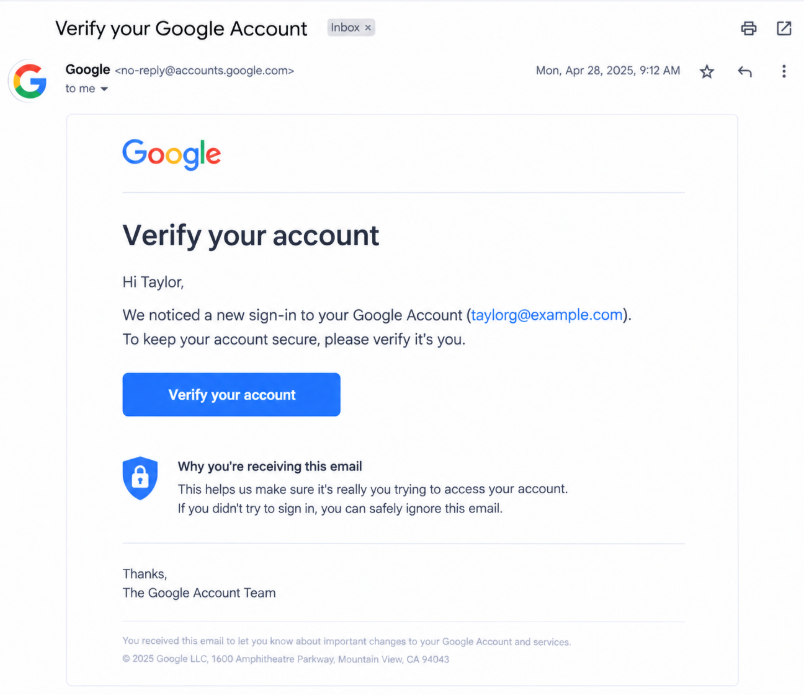
Example of an account verification and phishing scam

What Are Account Verification & Phishing Scams?

Account verification and phishing scams use fake security alerts, login pages, and verification requests to trick people into revealing sensitive information or giving scammers access to their accounts.


Scammers may:

  • Pretend to be a bank, social media platform, or online service
  • Claim that your account will be suspended unless you verify it
  • Send links to fake login or account recovery pages
  • Request passwords, verification codes, or payment information

These messages can arrive through email, text messages, social media, or phone calls. Their goal is often to create urgency so you act before checking whether the request is legitimate.

Legitimate Example

Example illustrating a legitimate account security notification

A legitimate service provides security notifications through its official app or website. You can independently open the service, review your account status, and follow its established security process without relying on a suspicious message link.
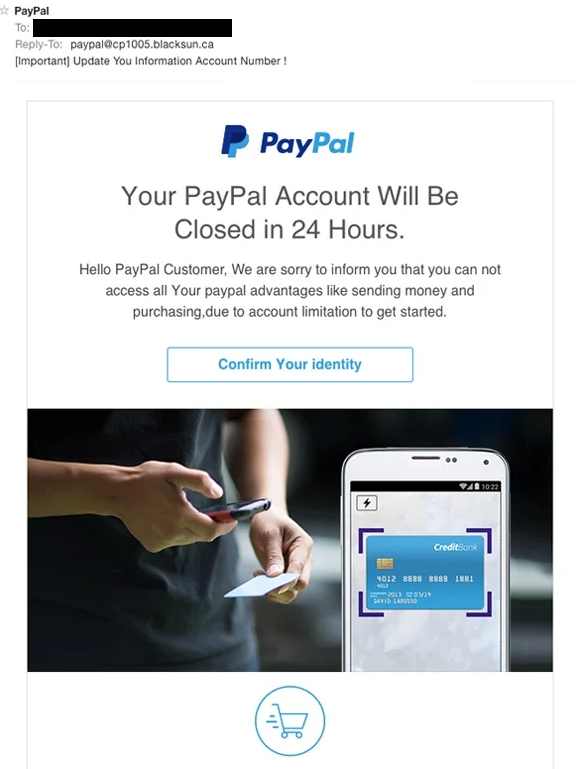
Scam Example

Example illustrating a fraudulent account verification message

A scammer sends a message claiming that your account will be permanently disabled unless you verify it immediately. The link leads to a fake login page designed to collect your password or verification code.


Remember: never trust a verification request solely because it uses a familiar company name or logo. Check the request through the service's official app or website.

How Account Verification & Phishing Scams Work

Scammers impersonate trusted services to make you reveal information they can use. Once they obtain your credentials or verification codes, they may attempt to access your accounts or misuse your personal information.


1. A Fake Security Alert

You receive an email, text, or message claiming that your account has been compromised, requires verification, or will be suspended unless you act quickly.

2. A Request to Verify

The message directs you to a fake website or asks you to provide your password, personal information, payment details, or a one-time verification code.

3. Your Information Is Misused

The scammer may use the information you provided to attempt account access, change account settings, impersonate you, or target you with further scams.

Common Spaces

Phishing and verification scams can appear in many places, including:


  • Email inboxes and spam folders
  • Text messages claiming an account needs attention
  • Social media direct messages
  • Fake login pages and account recovery websites
  • Messages impersonating banks or online services

Common Targets

Scammers may impersonate services people use regularly, including:


  • Banking and financial accounts
  • Email and social media accounts
  • Online shopping accounts
  • Gaming and subscription services
  • Work, school, and cloud storage accounts

Anyone can receive a phishing message, even if they have strong passwords or are familiar with online security.

What To Do

If you receive a suspicious verification request, take these steps:


  • Do not click links or provide information
  • Open the official service independently to check your account
  • Never share passwords or one-time security codes
  • Report suspicious messages to the impersonated service
  • If you shared information, secure your account immediately
Warning Signs / Red Flags
  • Urgent threats: The message claims your account will be deleted, locked, or suspended unless you act immediately.
  • Unexpected verification requests: You are asked to verify an account even though you did not initiate a login, password reset, or security change.
  • Suspicious links: The link uses an unfamiliar domain, misspelled company name, or address that differs from the service's official website.
  • Requests for passwords: A message asks you to send your password or enter it on a website reached through an unexpected link.
  • Requests for one-time codes: Someone asks you to share a login code or authentication code. These codes can sometimes be used to access your account or approve a login.
  • Unexpected attachments: The message asks you to download a file or open an attachment to verify your account.
  • Suspicious sender details: The sender's address or phone number does not match the service it claims to represent.
  • Unusual payment demands: You are told to pay a fee, purchase gift cards, or transfer money to restore or verify an account.
  • Unexpected account alerts: You receive a notification about a login, password reset, or account change that you did not initiate. Check it through the official service rather than following links in the message.

Remember: scammers can imitate official branding and write convincing messages. A message that looks professional is not necessarily legitimate, and unexpected alerts should be checked independently.

How to Stay Safe
  • Visit the official website directly: If a message claims your account needs verification, open the service's official app or type its known website address into your browser.
  • Inspect links carefully: Check the complete domain before opening a link. When in doubt, do not use the link in the message.
  • Never share verification codes: Treat one-time login codes and authentication codes as private. Do not give them to someone who contacts you unexpectedly.
  • Use strong, unique passwords: Avoid reusing passwords across services. A password manager can help you maintain separate passwords.
  • Enable multifactor authentication: Use an additional sign-in protection method where available, preferably one resistant to phishing.
  • Check account activity: Review recent sign-ins, security notifications, and account recovery settings through the official service.
  • Verify unexpected contact: If a message claims to come from a bank or service, contact the organization using contact details from its official website or app.
  • Keep software updated: Update your browser, operating system, and security software to help protect against known vulnerabilities.
  • Be cautious with attachments: Do not download files or install software simply because a message claims they are required to verify your account.
  • Pause before acting: Legitimate-looking logos and urgent warnings can be copied. Take time to check a request independently before responding.
What To Do If You've Been Scammed
  1. Secure the affected account. Open the service through its official app or website. Change your password if you shared it, and sign out of unfamiliar sessions where the service allows it.
  2. Protect other accounts. If you reused the exposed password elsewhere, change it on those accounts too. Prioritize your email account because it may be used to reset passwords for other services.
  3. Review account recovery settings. Check that the recovery email address, phone number, authentication methods, and other security settings have not been changed without your permission.
  4. Contact the official service. If you cannot access your account or notice unauthorized changes, use the service's official account recovery process or verified support channel.
  5. Contact your bank if needed. If you shared banking information, entered payment details, or notice unauthorized transactions, contact your bank or card issuer immediately using its official contact information.
  6. Save the evidence. Keep the suspicious message, sender details, website address, and relevant account alerts. These may help you report the incident.
  7. Report the phishing attempt. Report the message to the impersonated service or email provider. In the United States, you can also report suspected fraud to the Federal Trade Commission.
  8. Watch for follow-up scams. Be cautious of anyone claiming they can recover your account or money in exchange for a fee, password, or verification code.

If you entered a password or shared a verification code, act promptly. Securing your account quickly may help prevent further unauthorized access.

Quick Checklist

Frequently Asked Questions

What is a phishing scam?

A phishing scam is an attempt to trick someone into revealing sensitive information, clicking a malicious link, or taking another action that benefits a scammer. Phishing messages often impersonate trusted organizations and may arrive through email, text messages, or social media.

How can I tell if an account verification message is real?

Do not rely only on the sender's name, logo, or wording. Open the service's official app or website independently and check your account notifications. If the alert is not reflected there, contact the organization through a verified support channel.

Will a legitimate service ask me for my verification code?

Some legitimate sign-in processes require you to enter a code into the official app or website. However, you should not share a one-time code with someone who contacts you unexpectedly or asks you to read it to them. A scammer may use that code to attempt to access your account.

What if I clicked a phishing link but did not enter any information?

Close the page and do not download files, install software, or enter information. If you only opened the page, the risk may be lower, but it is still sensible to keep your browser and device updated. If you downloaded a file or notice unusual activity, take additional security steps.

What if I already entered my password?

Visit the official service directly and change your password as soon as possible. If you reused that password on other accounts, change it there too. Review active sessions and recovery settings, enable multifactor authentication, and contact the service if you lose access.

Can a phishing message look completely legitimate?

Yes. Scammers can copy company logos, imitate familiar layouts, and write convincing messages. This is why you should verify unexpected requests through an official app, website, or independently confirmed contact method instead of relying on appearance alone.

Why do scammers want access to my account?

Depending on the account, scammers may attempt to steal personal information, access financial services, impersonate you, send fraudulent messages to your contacts, or use the account to target you with further scams.

Don't wait until it happens to you.

Start Checking Messages